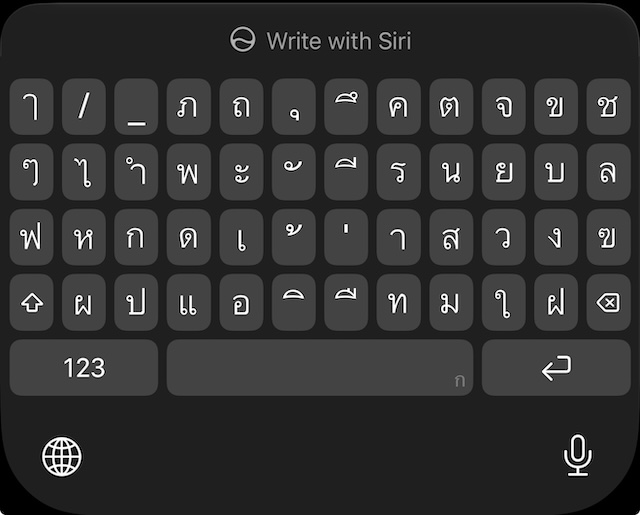
The 5-row Thai keyboard on iPhone. That is a lot of keys.
In Demystifying สวัสดีครับ I took the greeting apart letter by letter. Then I tried to type it.
Typing Thai is not trivial either. The 5-row keyboard can be intimidating. That is why I wrote this: for myself, and hopefully it is useful for others too.
I assume you already know the pieces: ส ว ั ส ด ี plus ค ร ั บ (or ค่ะ). If not, start with the reading post.
Set up the 5-row Thai keyboard
On iPhone: Settings → General → Keyboard → Keyboards → Add New Keyboard → Thai.
When Thai is active, open the keyboard layout menu (tap and hold the globe, or use the keyboard settings gear on some iOS versions) and pick the 5-row Thai layout. That one tracks the physical Kedmanee board Thais grow up with. The compact layouts save space; they also move letters around enough that a beginner’s search gets noisy. I stick with 5-row for this drill.
How the layout is organized
Thai needs roughly 44 consonants, a stack of vowel signs, four tone marks, plus numerals and punctuation. A phone still only has one key per finger-slot. Kedmanee (แป้นพิมพ์เกษมณี), the default Thai layout since mid-20th-century typewriters and later Thai Industrial Standard 820, solves that with frequency.
Rules of thumb:
- Common symbols stay unshifted. High-frequency consonants, everyday vowels, and the two busy tone marks (่, ้) sit on the face you see. Rare consonants and Thai digits hide under Shift.
- The top character row is not a number row. Unshifted you get letters and vowels (ภ, ถ, ุ, ึ, ค, ต, จ, ข, ช, …). Thai numerals live on Shift of that row. Western
123is a separate toggle on the bottom left. English habit says “top row = digits.” On Thai, that row was given to letters instead. - Vowels and tones are mixed into the consonant rows. There is no “consonant block, then vowel block.” The home-ish row (row 3 in the photo: ฟ ห ก ด เ ้ ่ า ส ว ง …) puts frequent consonants (ก, ด, ส, ว) next to the preposed vowel เ and the tone marks ้ / ่. Row 2 holds short vowels and marks such as ะ, ั, ี. Row 4 holds more vowels (แ, ิ, ื, ใ, …) beside consonants like ป, อ, ท, ม.
- Marks that sit above or below a letter are still their own keys. ั, ี, ิ, ุ, ่, ้ look like small signs between full consonants. They are full keys. You type the consonant, then the mark; the phone stacks the glyph.
- Five rows on iOS means four character rows + the system row. Rows 1-4 are Kedmanee. Row 5 is
123, space, and return (plus globe / mic). Compact Thai layouts on iPhone collapse or reshuffle this map. 5-row keeps the physical-board geography so tutorials and muscle memory transfer.
A crude map of the screenshot:
| Row | Job on the unshifted 5-row board |
|---|---|
| 1 | Frequent consonants + below-line vowels (ุ, ึ); not Western digits |
| 2 | More consonants + short vowels / above-line marks (ะ, ั, ี) |
| 3 | Home mix: ฟ ห ก ด · เ ้ ่ า · ส ว ง … |
| 4 | Shift · more consonants / vowels (ป แ อ ิ ื ท ม ใ ฝ) · delete |
| 5 | 123 · space · return |
Now the structure is clear, but some letters I just learned seemed to be missing.
They are not missing. Thai has two common drawings for the same letters.
Loopless in the app, looped on the keys
Loopless / cut-head Thai (ตัวไม่มีหัว / หัวตัด): a modern, reduced face. Designers drop or flatten the head loops so Thai sits next to Latin sans-serif type. A lot of apps, signs, and UI chrome use this. NidNoi, where I first learned สวัสดีครับ, shows the greeting this way:
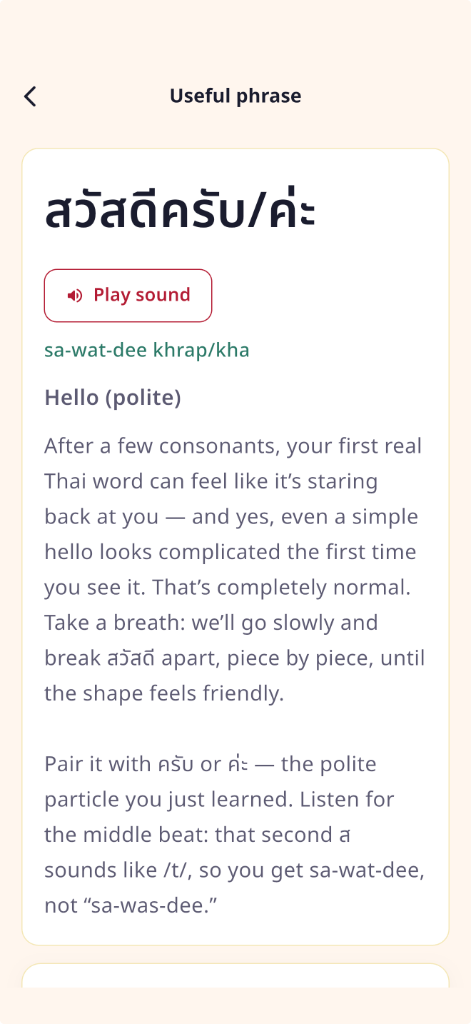
NidNoi: loopless สวัสดีครับ/ค่ะ.
Looped Thai (ตัวมีหัว, “with heads”): many consonants start with a small circle, the hua (หัว). School charts and handwriting train that look. The iPhone 5-row keycaps in the screenshot above use this form too.
Same letter. Different drawing. ส in NidNoi and ส on the phone key are both “so sua.” I had drilled the loopless form. The keycap kept the head loop.
Side by side: ส (NidNoi / loopless) · ส (keycap / looped).
That was my “missing alphabet” moment. My eye was hunting for the NidNoi glyph. The board was showing the looped version of the same character. Look again at row 3: ส sits two keys left of the right edge, next to ว. Once I stop requiring the app drawing, those two keys are easy to find.
Thai typography treats this as a real design choice, not a beginner bug. Loopless faces win a lot of display and interface work. Looped faces still dominate long reading and, on current iOS, these keyboard labels. Day one for me: the letter I learned and the keycap can look different and still be the same key.
Shift holds the rare consonants (not these ones)
That frequency split shows up again here. The photo is the unshifted layer. Less common consonants live under the up-arrow Shift key: letters for names and Sanskrit-heavy spellings, not for สวัสดีครับ.
Tap order for สวัสดีครับ
Thai vowels and marks are typed in logical order: the base consonant first, then the mark that sits above or below it. I do not hunt for a precomposed วั or ดี block. I build them.
| Step | Key | Where on the 5-row board | Notes |
|---|---|---|---|
| 1 | ส | Row 3, near the right | first /s/ |
| 2 | ว | Row 3, immediately right of ส | |
| 3 | ั | Row 2, middle cluster | mai han-akat; sits above ว → วั |
| 4 | ส | Row 3 again | second ส (the one that sounds like /t/ when spoken) |
| 5 | ด | Row 3, left-middle | |
| 6 | ี | Row 2, right of ั | long i; sits above ด → ดี |
| 7 | ค | Row 1, right-middle | start of ครับ |
| 8 | ร | Row 2, right of ี | |
| 9 | ั | Row 2 again | sits above ร → รั |
| 10 | บ | Row 2, near the right | final บ → spoken /p/ |
Female speakers swap the ending for ค่ะ: ค + ่ (tone mark, row 3 center) + ะ (row 2).
The floating marks (ั, ี, ่, ้, …) look like punctuation, not “letters.” They are still full keys. If I only scan for big consonant glyphs, I skip the vowels that finish the word.
Ten taps. One greeting I can actually send. It is also the longest hello (in time spent) that I have ever typed. But now I know how.