If you learned desktop UI on AWT or Swing, JavaFX will feel familiar for a reason. ActionListener, MouseListener, Swing’s PropertyChangeListener, and JavaFX’s EventHandler / ChangeListener / bind are the same design idea under different names: the Observer pattern. A subject holds state (or fires an input event). Observers register. When something changes, the subject notifies; nobody polls in a loop.
That is where the “data backing” for a UI comes from. Not a special JavaFX invention. AWT already routed button presses through listeners. Swing kept that and added JavaBeans-style property change events for many component fields. JavaFX pushes the same Observer contract further: every interesting field on a node is a first-class Property, lists of children are ObservableLists, and bind wires one observable to another so you stop writing the notify/update boilerplate by hand.
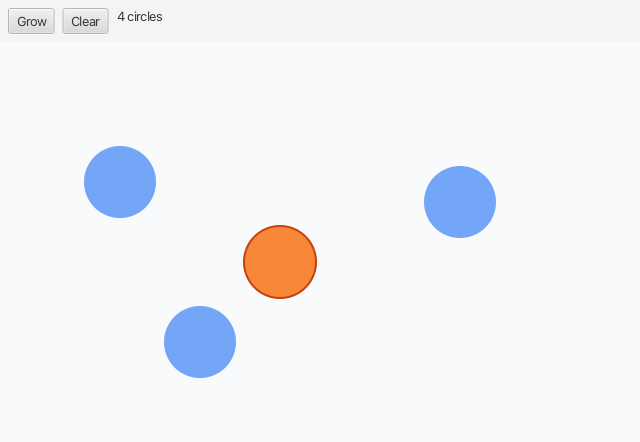
The sample below is a small window that drops a circle on empty clicks, highlights the circle you click, and grows every circle from one shared radius. It is a tour of Observer in three places: mouse/button events, a DoubleProperty that nodes subscribe to, and a list listener on getChildren().
Source: github.com/zlu/javafx-click-circles. Maven / OpenJFX setup matches Play a local MP4 with JavaFX Media; this sample only needs javafx-controls.
git clone https://github.com/zlu/javafx-click-circles.git
cd javafx-click-circles
mvn javafx:run
Observer
Classic roles:
| Role | Meaning | In this sample |
|---|---|---|
| subject | holds a value or can fire an event | DoubleProperty radius, drawing.getChildren(), the Pane that receives clicks |
| observer | registered interest | EventHandler, ChangeListener, ListChangeListener, or a bound radiusProperty() |
| notify | subject tells observers after a change | click delivered, radius.set(...), child added/removed |
AWT: button.addActionListener(...). Swing: same, plus addPropertyChangeListener on beans. JavaFX: setOnAction / addEventFilter for input; property.addListener or other.bind(property) for data. Same pattern. The rest of the post is that pattern applied to circles.
Window and Pane
Pane places children by each node’s own coordinates. A Circle uses centerX / centerY / radius, so click coordinates map straight onto the circle. BorderPane or VBox would fight you here; they own layout.
Put the drawing surface in the center and chrome (Grow, Clear, status) on top. That way the buttons are not mixed into drawing.getChildren() next to the circles.
Pane drawing = new Pane();
drawing.setPrefSize(640, 400);

Button grow = new Button("Grow");
Button clear = new Button("Clear");
Label status = new Label();

HBox top = new HBox(8, grow, clear, status);
BorderPane root = new BorderPane();
root.setTop(top);
root.setCenter(drawing);
Mouse click → create or select
MouseEvent has a target: the deepest node under the pointer. Click empty pane area and the target is the Pane. Click a circle and the target is that Circle. I register an event filter on the drawing pane so every click in that area runs through one place, then branch on the target.
drawing.addEventFilter(MouseEvent.MOUSE_CLICKED, e -> {
    if (e.getTarget() instanceof Circle c && drawing.getChildren().contains(c)) {
        selected.set(c);   // ObjectProperty<Circle>
        e.consume();
        return;
    }
    Circle c = new Circle(e.getX(), e.getY(), radius.get());
    c.setFill(FILL_NORMAL);
    c.radiusProperty().bind(radius);
    drawing.getChildren().add(c);
    selected.set(c);
});
Selection is visual only: a ChangeListener on selected restyles the previous circle (blue, no stroke) and the new one (orange fill + stroke). Grow still scales all circles; selection does not change who grows.
| Click | Target | Action |
|---|---|---|
| empty pane | Pane |
create circle at (getX(), getY()), select it |
| existing circle | Circle |
select that circle (color change) |
That is Observer for input (AWT/Swing listeners under a JavaFX API):
| Piece | Role |
|---|---|
| event type | MouseEvent.MOUSE_CLICKED, ActionEvent on a button, … |
| target | the Node under the pointer (or the control that fired) |
| filter / handler | the observer; filter on the parent sees child hits too |
| scene graph | after you mutate it, the next pulse redraws |
Handlers answer “something happened.” They do not by themselves keep two values in sync. For that you need Observer on data: properties.
Grow, way A: walk getChildren
The blunt approach. On each button press, scan the drawing pane, keep only Circle nodes, multiply radius by a factor.
final double growFactor = 1.25;

grow.setOnAction(e -> {
    for (Node n : drawing.getChildren()) {
        if (n instanceof Circle c) {
            c.setRadius(c.getRadius() * growFactor);
        }
    }
});
getChildren() returns an ObservableList<Node>. Everything in that list is a Node, so you need instanceof (pattern match in modern Java) before you can call setRadius. It works. It also couples the button to the current child list: add a Label overlay later and you must remember the filter.
This is push-by-search: every grow action re-discovers the circles and writes a new radius. The sample repo does not use this path for Grow; it is the teaching contrast.
Grow, way B: DoubleProperty + bind
JavaFX nodes expose bean-style properties: radiusProperty(), centerXProperty(), and so on. That line goes back through Swing/JavaBeans: a field is not only a getter/setter; it is a subject that can notify. A JavaFX Property is an observable value. bind registers the dependent property as an observer and copies updates for you.
Own one shared radius. Bind each new circle’s radiusProperty to it. The Grow button only multiplies the shared value. Every bound circle grows, selected or not.
DoubleProperty radius = new SimpleDoubleProperty(20);
final double growFactor = 1.25;

// when creating each circle:
c.radiusProperty().bind(radius);

grow.setOnAction(e -> radius.set(radius.get() * growFactor));
After bind, every bound circle tracks radius. The button never calls getChildren() or instanceof. One subject, many observers. That is the data backing: the radius lives in a property; the scene graph does not own a private copy you have to hunt down.
Multiply (rather than + 5) makes the shared-value story obvious. Click Grow a few times and every circle scales by the same factor, including circles you add later (they start at the current radius.get()).
Bind gotcha
A unidirectional bind makes the circle’s radius read-only from your code. c.setRadius(...) after bind throws. To grow, set the source property (radius.set(...)), or unbind() first. That constraint is the point: the property owns the value; the node follows.
ChangeListener (middle ground)
If you do not want bind, you can still avoid scanning only at button time by listening to the property and then writing radii. That is still a manual fan-out. Prefer bind when each node has a matching property.
ObservableList listener
getChildren() is not a plain ArrayList. It is an ObservableList. You can listen for add/remove without touching Grow:
drawing.getChildren().addListener((ListChangeListener<Node>) change -> {
    long n = drawing.getChildren().stream().filter(c -> c instanceof Circle).count();
    status.setText(n + (n == 1 ? " circle" : " circles"));
});
Create and Clear both mutate the list; the label updates from the list change, not from duplicated status.setText calls at every call site. Same Observer idea as DoubleProperty: the collection is the subject; UI that cares about membership registers as an observer.
Clear and unbind
Before removing bound circles, unbind so the shared property is not still wired to nodes you are about to drop:
selected.set(null);
for (Node n : drawing.getChildren()) {
    if (n instanceof Circle c) {
        c.radiusProperty().unbind();
    }
}
drawing.getChildren().clear();
radius.set(20);  // reset for the next batch
JavaFX bindings often use weak listeners, so a removed node is usually eligible for GC even without unbind. Explicit unbind is clearer in teaching code and avoids surprises if something else still holds a reference to the Circle.
Observer, twice
AWT and Swing already split “input happened” from “a bean field changed.” JavaFX keeps that split and makes the data side heavier.
| Subject | Trigger | Observer API | Lineage |
|---|---|---|---|
| control / pane | user input | setOnAction, addEventFilter |
AWT/Swing listeners |
Property |
value changed | bind, addListener |
JavaBeans / Swing PropertyChangeListener |
ObservableList |
membership changed | addListener |
same Observer idea on a collection |
Events: click target is pane or circle → create or select.
Properties: Grow writes radius → all bound circles follow.
List: children change → status label updates.
Way A (walk getChildren and setRadius) skips the data Observer: the button handler reaches into the graph and pushes. Way B keeps the radius in a subject and lets nodes observe it. That is the upgrade from “listener that mutates widgets” to “listener that mutates the model the widgets already observe.”
Summary
- Observer is the backing model: AWT/Swing listeners for input, beans/properties for data.
- Event filter on the pane: empty click creates a circle; circle click selects (color).
- Grow by search (contrast): loop children,
instanceof Circle,setRadius(r * factor). - Grow by property (sample):
SimpleDoubleProperty,radiusProperty().bind(radius), button doesradius.set(radius.get() * factor)for all circles. ObservableListlistener keeps the count label honest.- Clear unbinds, then
getChildren().clear().
For anything past a toy, put shared state in a property (or a small model of properties) and let the scene graph observe it. Walking getChildren is a good teaching contrast and a last resort when you do not control how nodes were created.