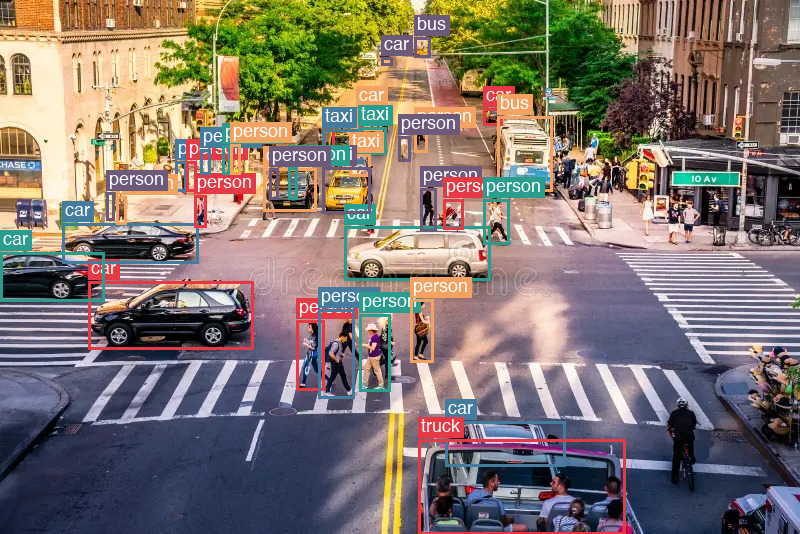
Autonomous-driving demos put colored rectangles on cars and people. In computer vision, that link from a phrase (“person in the crosswalk”, “yellow taxi”) to a region in the frame is visual grounding. The rectangle is how you draw the region. This is not the RAG sense of grounding, which means tying answers to documents.
A vision-language model (VLM) can do a still-image version of that. I pass a traffic photo and a text prompt. The model writes JSON with labels and coordinates. Code parses that string, draws the boxes with Pillow, and writes a PNG. Production AVs usually run dedicated detectors and trackers on video. Below is only the VLM path on one photo, zero-shot inference on Apple Silicon (MPS).
What I cover:
- the VLM stack (vision encoder, projector, LLM)
- why the coordinates arrive as JSON text, not as box tensors from a detection head
- the local inference loop that writes the annotated PNG
What a VLM is
Most open VLMs look like this:
image  →  vision encoder  →  projector  →  LLM embedding space
                                              ↓
text prompt  →  tokenizer  →  token embeddings ─┘
                                              ↓
                                    next-token generation
                                              ↓
                                         text (maybe JSON boxes)
- Vision encoder. Turns the frame into a sequence of vectors (patches / tiles). That is what lets the model take a photo of a crowded intersection as input, not only a text description of traffic.
- Projector. Maps those vectors into the same width as the language tokens, so vision and text sit in one sequence. You can ask “box every pedestrian in the crosswalk” on the same model that answers in English.
- LLM. An instruct language model that writes the reply. For grounding, the reply is often JSON with labels and coordinates. There is no separate detection head. The numbers are more text.
I used Qwen/Qwen3-VL-4B-Instruct from Hugging Face via transformers. The first load pulls the weights onto disk; after that, inference runs locally on MPS. There is no live call to Hugging Face per image.
When I ask “where are the pedestrians?”, the model does not return a tensor of boxes. It returns a string, for example [{"label":"person","bbox_2d":[120,80,640,900]}]. Parsing that string, mapping the numbers to pixel corners, and drawing rectangles is ordinary post-processing. The VLM stops at text.
Why boxes make a useful check
Captioning returns a sentence (“a busy street”). Grounding returns coordinates you can paint on the cars and people. If the PNG looks wrong, the failure is obvious: missed pedestrian, box on the wrong car, box too large, or unparsable JSON.
I ask for a fixed JSON schema with bbox_2d in 0-1000 (relative to width and height). That matches how Qwen3-VL is usually prompted for locations. Post-processing maps those numbers back to pixels and draws rectangles.
Inference on Mac (MPS)
Stack: PyTorch with MPS, transformers, Pillow. Model id: Qwen/Qwen3-VL-4B-Instruct in float16.
The prompt asks for every car / bus / truck / taxi / pedestrian as a JSON array, one object per detection, bbox_2d in 0-1000.
Loop:
- pick MPS if available, else CPU
- load the model and processor
- apply the model’s chat template with one image + text
- generate text, parse the JSON list (with a regex fallback when the model packs duplicate keys into one object)
- draw labeled colored boxes with Pillow and write a PNG
Core call:
messages = [{
    "role": "user",
    "content": [
        {"type": "image", "image": image},
        {"type": "text", "text": query},
    ],
}]
inputs = processor.apply_chat_template(
    messages,
    tokenize=True,
    add_generation_prompt=True,
    return_dict=True,
    return_tensors="pt",
)
inputs = inputs.to(device)
out_ids = model.generate(**inputs, max_new_tokens=1024)
After generation: parse bbox_2d, scale 0-1000 → pixels, ImageDraw.rectangle.
Code: gist
What I actually saw on this photo
I first tried Qwen3-VL-2B-Instruct on the same NYC still. It mostly returned cars, often as one malformed JSON object with many repeated "bbox_2d" keys, and it skipped the bus and the people in the crosswalk. Tiny distant boxes also piled up in one lane.
Qwen3-VL-4B-Instruct on the same prompt and image returned cars, taxis, a bus, and many person boxes. The raw string still packed several detections into single objects (duplicate keys). Standard json.loads keeps only the last key of each name, so I walk "label" / "bbox_2d" pairs with a regex before drawing. Save the raw model string next to the PNG; that is how you separate parse failures from localization failures.
| Check | What it tells you |
|---|---|
| Raw model string | Schema drift, truncated JSON, duplicate keys |
| Annotated PNG | Spatial success or failure, independent of how fluent the text looks |
| Parsed box count | Parse success; zero boxes with a long raw dump means format failure, not “empty scene” |
VLM box text vs a detector
| VLM grounding (this post) | Classical detector (YOLO / RetinaNet) | |
|---|---|---|
| Output | Text tokens (JSON / box markup) | Box tensors from a detection head |
| Train signal (if you fine-tune later) | Token cross-entropy on the string | Localization + classification losses |
| Runtime job here | Chat over an image | Dense predict-and-NMS |
Same screenshot can come from either path. The mechanism is not the same. This demo only shows the VLM path.
Takeaways
- A VLM is vision vectors projected into an LLM, then ordinary next-token generation.
- Grounding is useful because you can see the answer on the image.
- On a Mac,
Qwen3-VL-4B-Instruct+ MPS is enough to run the loop and save PNGs. 2B was too weak on this dense intersection. - Keep the raw string next to the drawing. Parse failures and localization failures look similar on the PNG if you only keep the picture.